Extending it
Biometrics and keychain
Two plugins that go together — the system's biometric check, and secrets stored where the system stores its own.
Two plugins, written outside the core, that are the reason the permissions mechanism exists:
@angular-native/plugin-biometrics—LAContexton iOS,android.hardware.biometrics.BiometricPrompton Android.@angular-native/plugin-keychain— Keychain Services on iOS, anAndroidKeyStorekey over an app-private file on Android.
They go together on purpose. Storing something “securely” that anyone can read
back protects nothing, and asking for a face without tying it to what decrypts
is theatre. examples/secrets uses both.
Biometrics
Section titled “Biometrics”The system draws the dialog. The plugin never sees a face or a fingerprint — only how it ended.
const info = await biometrics.availability()// { status: 'available', kind: 'faceId', detail: 'LAContext.canEvaluatePolicy' }
const result = await biometrics.authenticate({  reason: 'Check it is you',  cancelTitle: 'Not now'})// { outcome: 'success', kind: 'faceId', detail: 'evaluatePolicy' }
It does not answer yes or no
Section titled “It does not answer yes or no”A boolean flattens eleven situations into two, and four of them need the app to
do something different — send the user to Settings, offer the passcode, hide the
button, just try again. So authenticate() resolves with an outcome:
outcome |
What happened | What an app usually does |
|---|---|---|
success |
Authenticated. | Carry on. |
failed |
Biometry ran, recognised nobody, and the system gave up. | Offer to try again. |
userCancel |
The user dismissed the sheet or pressed cancel. | Nothing. They know. |
userFallback |
The user asked for the device passcode and it was not allowed. | Call again with allowDeviceCredential: true. |
systemCancel |
The system took the sheet away — app backgrounded, a call came in. | Nothing, or retry later. |
timeout |
The attempt timed out. Android only, see below. | Offer to try again. |
noHardware |
No biometric sensor on this device. | Do not show the button at all. |
notEnrolled |
Sensor, but no face or finger registered. | Point at Settings. |
passcodeNotSet |
No device passcode, and without one there is no biometry. | Point at Settings. |
lockedOut |
Too many failed attempts. | Offer the device passcode. |
permanentlyLockedOut |
Locked until the device is unlocked with the passcode. Android only. | Offer the device passcode. |
unavailable |
Sensor present, system not lending it. detail says why. |
Fall back to a password. |
The promise only rejects when the caller got it wrong — an unknown method, a
missing reason, the plugin not compiled into the app. Cancelling, failing,
having no sensor and being locked out are answers, not errors.
detail is what the system said — the LAError code and message, or the
BiometricManager constant. It is diagnostic, not interface: it is in English,
it changes between OS versions, and it explains nothing to a user.
Where the two platforms genuinely differ
Section titled “Where the two platforms genuinely differ”None of these are smoothed over, because smoothing them over means lying on one of the two:
- Which biometry it is. iOS says so (
faceId,touchId,opticId); Android’sBiometricManageranswers whether it can authenticate, not with what, sokindisunknownthere. Filling infingerprintbecause most Androids are would be wrong on exactly the ones with a camera. - Temporary versus permanent lockout. Android has two error codes; iOS has
one (
biometryLockout). SopermanentlyLockedOutonly ever comes from Android. Faking it on iOS by counting attempts would be inventing it. - A single non-match. On Android the sheet stays up and the plugin does not
answer — answering would close the promise with the dialog still open, and the
real result would have nowhere to go. On iOS the sheet offers a retry, and
what eventually arrives is
failed,userCancel, or a timeout. - Timeouts. Android reports
BIOMETRIC_ERROR_TIMEOUT, which becomestimeout. iOS emits anLAErrorwhose code (−1003) is not in the publicLAError.Codeenum, so it arrives asunavailablewith"LAError -1003: Authentication timed out."indetail. Mapping an undocumented number would be guessing; the message is exact. - Android needs Android 10.
BiometricPromptarrived in Android 9, butBiometricManager.canAuthenticate— the only way to answeravailability()without showing a dialog — arrived in Android 10 (API 29). Below that the plugin answersunavailablewith the API level indetail, instead of pretending.
Keychain
Section titled “Keychain”await keychain.set('session-token', token, { requireBiometrics: true, reason: 'Store the session token protected by your face'})
const read = await keychain.get('session-token', { reason: 'Show the token' })// { outcome: 'found', value: '…', detail: 'SecItemCopyMatching' }has() and remove() never prompt: knowing an item exists is not opening it,
and the keychain lets you throw away an item you cannot read — which is just as
well, or a secret tied to a deleted fingerprint would sit there forever.
A read answers found, notFound, denied, invalidated or unavailable.
notFound and denied are not the same thing and flattening them is the
classic mistake in this kind of API: the first means ask for the password again,
the second means the secret is still there and whoever is holding the phone has
not proved they own it. Logging the user out on the second one punishes them for
dismissing a dialog.
What it actually protects
Section titled “What it actually protects”iOS — Keychain Services. Each secret is a kSecClassGenericPassword with
the bundle identifier as its service.
| Question | Answer |
|---|---|
| Another app reading it? | No. Keychain access groups separate apps. |
| Reading the file off the device? | No. Encrypted at rest; readable only after first unlock (kSecAttrAccessibleAfterFirstUnlockThisDeviceOnly). |
| Does it survive uninstalling the app? | Yes. iOS does not delete keychain items when an app is removed. Reinstall and they are still there. Delete explicitly on logout if that matters. |
| Does it travel in a backup? | No. …ThisDeviceOnly keeps it out of iCloud Keychain and out of encrypted backups. |
| Does it survive moving to a new phone? | No, for the same reason. |
With requireBiometrics? |
The item is bound to the enrolled set (.biometryCurrentSet). Enrol another face and iOS throws the key away — the item is gone, and a read answers notFound. That is what stops someone who knows the passcode from adding their own face and helping themselves. |
| A jailbroken device, a debugger, or the app leaking the value after reading it? | No. None of this protects a compromised device or a careless app. |
Android — there is no keychain. Android has no API that stores a secret for
you; what it has is a key store that holds keys and refuses to hand them over.
So the equivalent is built from two pieces: an AES-256-GCM key generated inside
AndroidKeyStore, which never leaves it, and the secret encrypted with it in a
MODE_PRIVATE preferences file.
| Question | Answer |
|---|---|
| Another app reading it? | No. The file is app-private and the key is not exportable. |
| Is the key in hardware? | It depends on the phone. TEE or StrongBox where there is one, software where there is not. keychain.backing() asks and tells you, because it is not the same guarantee and a serious app may want to refuse the weaker one. |
| Does it survive uninstalling the app? | No. The file and the key both go. |
| Does it travel in a backup? | The encrypted file may. The key never does, so restored on another device it cannot be decrypted. |
| Does it survive moving to a new phone? | No. |
With requireBiometrics? |
The key is generated with setUserAuthenticationRequired(true) and setInvalidatedByBiometricEnrollment(true), and every use goes through BiometricPrompt with a CryptoObject. Enrol another fingerprint and the key is destroyed; the stored value stays and can never be opened, which is the invalidated outcome. |
| A rooted device? | Weaker. With hardware backing the key still cannot be extracted, but an attacker with root can ask the key store to use it. With a software key store, they can take it. |
One difference you have to know about
Section titled “One difference you have to know about”On iOS, saving does not prompt and reading does. On Android, saving prompts
too. The Android key store ties authentication to every use of the key, and
encrypting is a use. It is not an oversight and it is not hidden: it is written
in the TypeScript contract next to requireBiometrics. Hiding it would mean
encrypting with a different key, and then the protection would be a different
protection.
The other difference is invalidated: Android reports the entry as permanently
unreadable, while iOS deletes it and reports notFound.
What is verified, and where
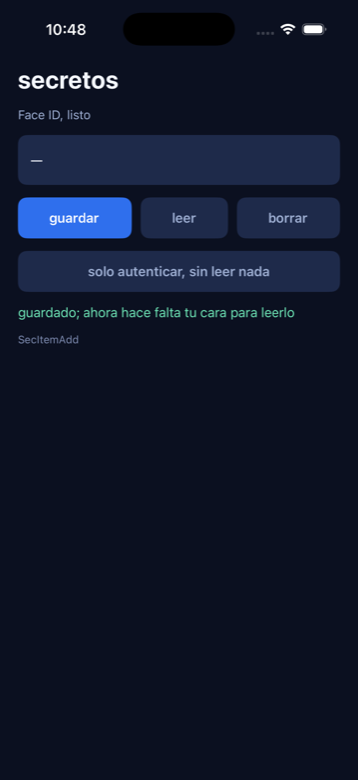
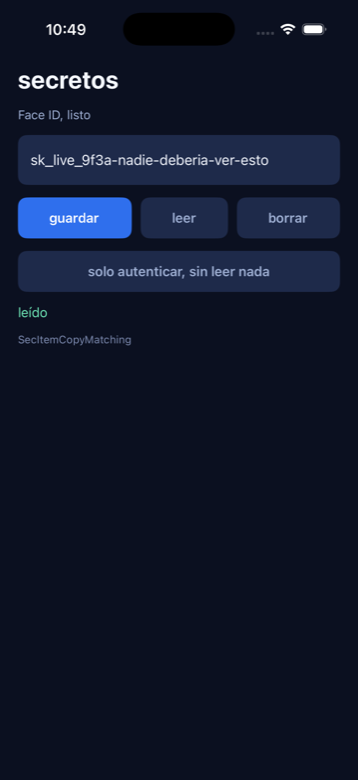
Section titled “What is verified, and where”- iOS, on the iPhone 17 Pro simulator, seen working: which biometry the
device has and whether anything is enrolled; a matching face authenticating; a
non-matching face being rejected by the system with nothing revealed; a secret
saved with
SecItemAddand read back withSecItemCopyMatching; and theNSFaceIDUsageDescriptionandkeychain-access-groupsthat make both of those possible being merged into the app byan. - Not verifiable on the simulator: the simulator does not enforce
SecAccessControl. An item stored with.biometryCurrentSetis handed back bySecItemCopyMatchingwithout ever showing Face ID. The access control is on the item — the code that sets it is the same code that runs on a device — but the gate itself is only real on hardware with a Secure Enclave. - Android: the Java of both plugins compiles against
android.jar, and the manifest merge prints the permission and the feature it adds. That is all. The full APK build did not finish — the machine ran out of disk duringaapt2 link— and no emulator was ever started. Nobody has watched any of this run on Android.
The screenshots
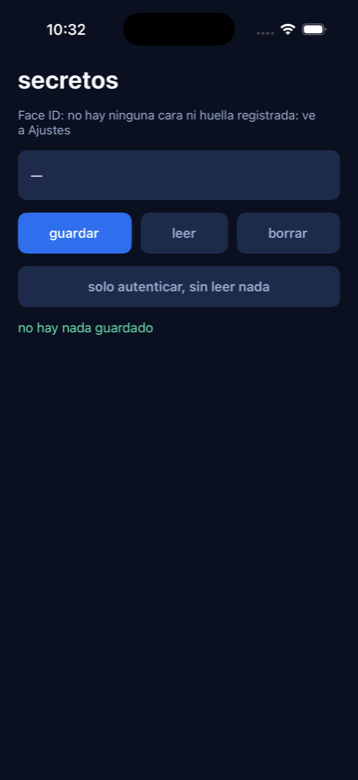
Section titled “The screenshots”Nothing is enrolled yet, and the app says exactly that instead of showing a button that would fail:
A matching face — Features › Face ID › Matching Face in the Simulator:
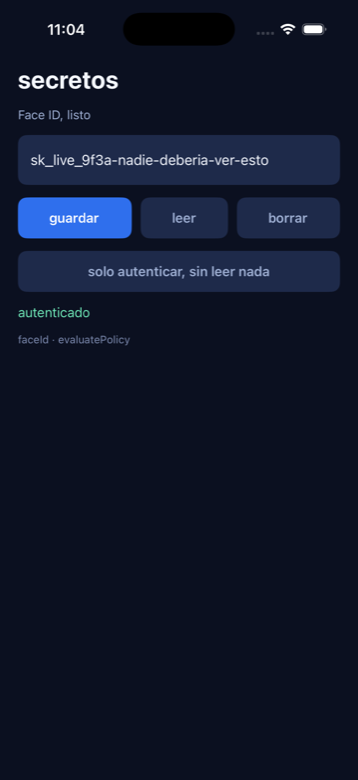
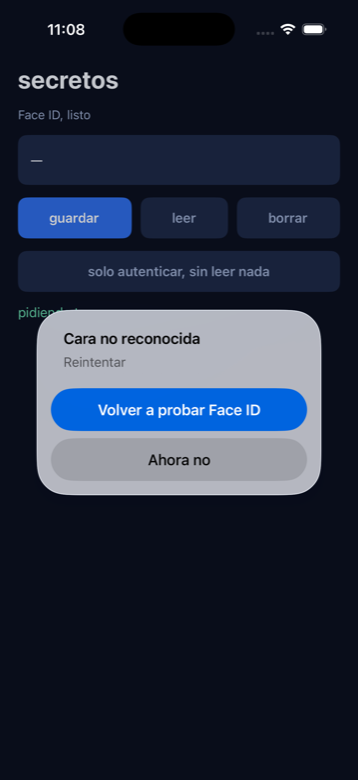
A non-matching one. The system rejects it, the app is still waiting, and the box is still empty:
Saving a secret, and reading it back: